TK Domain Free: You can also buy your domain in this way for free. (TK Domain Free) First of all, you can log in with your Gmail, that is, it is written that social login, click there. As soon as you click on social login, a window will appear in front of you in which you will be asked to login with Gmail, then you can login by entering your Gmail and password.
.TK Domain Free
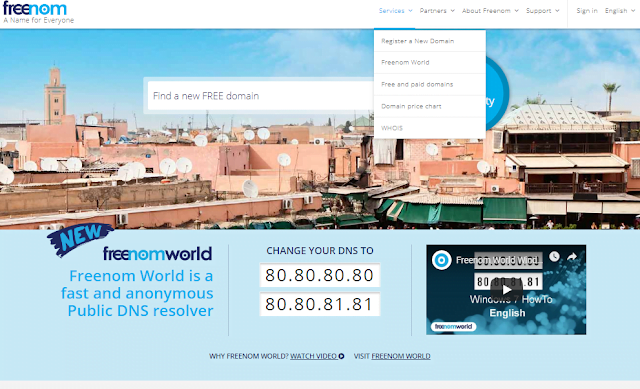
You come here where service is written, you click there, after clicking there a window will open in front of you like this, in the window where domain is written register new domain, click there, after clicking another window will open in front of you, from there you can buy for free
.TK Domain Free to create website
Everyone wants to earn money in today’s time and we will keep bringing new ways of earning money in front of you. Let us see today how we can buy a free domain for our website i.e. the blog that we have created, Blogger Spot, so let us see.
TK Domain Free: We have a free domain provider by the name of freenom from which we can get a free domain, so let us see how we can get a free domain for our blog spot.
Also Read: How To Create A Free Blog On Blogger 2026
.TK Domain is available for free, know more
First of all you have to go to the free website whose link is given here, by clicking on it you can go to this website i.e. Freenom ‘s website, with the name under which you have created the blog, you will get the domain of the blog name for free with the same name, so let’s see, you have to buy it from Freenom .
(TK Domain Free) Today we are going to learn how we can buy a custom domain for our website from Freenom, that too absolutely free. So friends, in our last post we had created a blog on Blogspot on Blogger named Hindibloggingdunia.blogspot.com. Today we will buy a TK domain from Freenom for this , that too absolutely free, there is no charge for it.
So first of all we will search for Hindi Blogging Duniya on freenom. (TK Domain Free) All the domains available with this name will be displayed. Here in the search bar that is visible, we will click on Check Availability and different domains will be displayed which will include Hindi Blogging Duniya .TK, LGSEFGQ. In this way you will see a lot of domains there, you can use whichever you like.
Also Read:
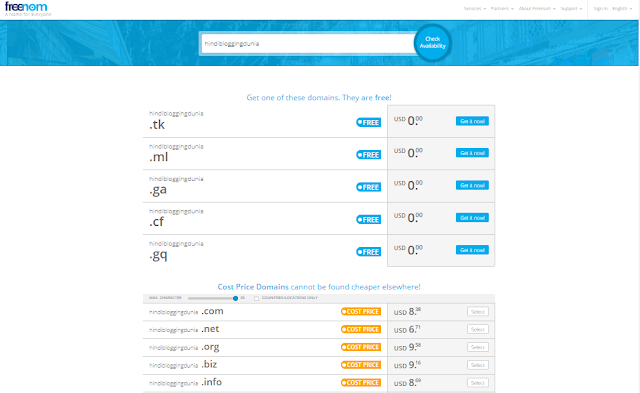
Now you have to click on Get It Now hindibloggindunia.Tk Now before I check it out I will upload its photo here so that you can see how I am doing it and you will also understand it.
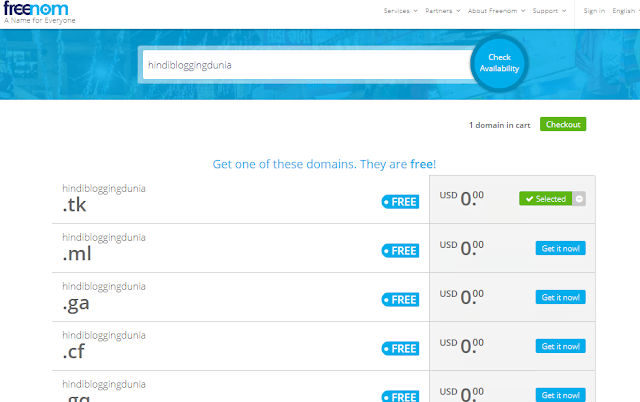
Now you just have to click on checkout. As soon as you click on checkout, a new window will open in front of you. In the new window, where it is written ‘3 Month Free’, you have to change it to 12 months and then click on continue.
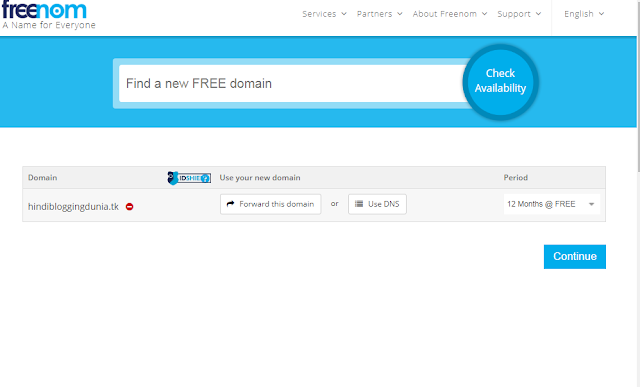
If you want it for a short time then you can check for a shorter time also. Different times are given in it. You can also take it for 11 months. In this way you can change the time as you want to use it and click on continue. After clicking, a new page will appear in front of you.
(TK Domain Free) In which you will be asked to get your email verified (Please enter your email address and click verify to continue to the next step) I am uploading the photo for you, you can see it here, here you will get your email verified or you can also login from your social account, you can also get it verified from Facebook
When you enter your email address and click to verify your account, a new window will open in front of you in which it will be written Review and Checkout
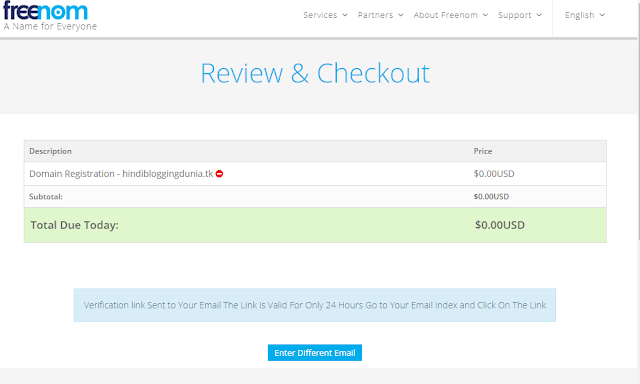
There you will see the verification link given below, Send to your email, the link is valid only for 24 hours. This means that the link which has come on your email is available only for 24 hours, after that you cannot use that link, you will have to go for verification again, so let us check our email in which that verification link has come, we will click on it, which will get our account verified.
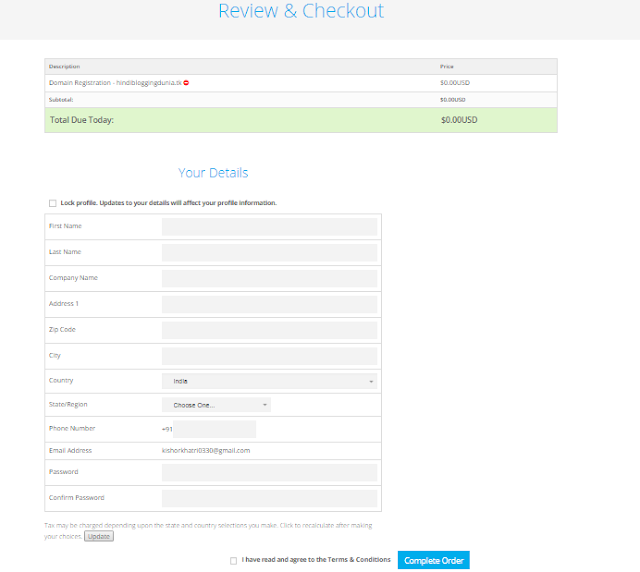
If you click on the email that came to you, a window will open in front of you. In this window, you will be asked to enter your details. After entering the details, you will now have to accept their terms and conditions, i.e., I have read and agree to the terms and conditions and click on order, click on complete order and the domain will be yours.
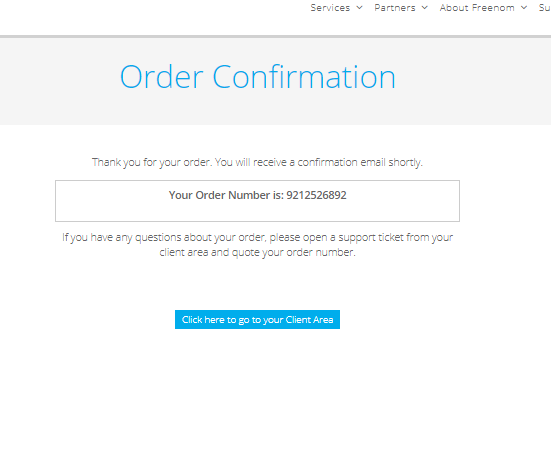
And a new window will open in front of you in which order confirmation will be written and your order number will appear there, which means your domain has been purchased and you can see it.
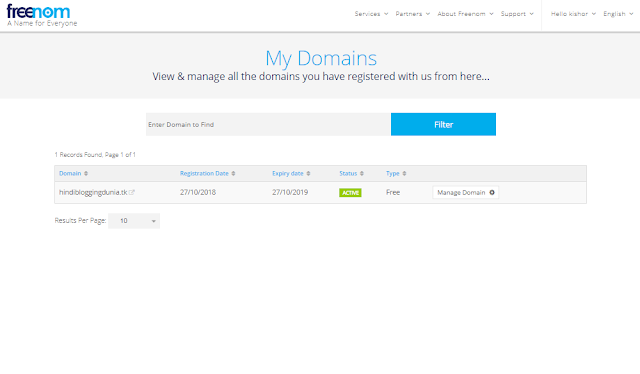
Now you can see your domain, inside service it is written my domain, if you click there then you will see your domain.
Question- Answer (FAQs)
What is a TK domain?
A TK domain is a top-level domain (TLD) assigned to Tokelau, but it’s widely used globally. It offers an opportunity for individuals and businesses to register a domain for free.
Can I really get a TK domain for free?
Yes, you can register a TK domain for free through platforms authorized by Dot TK, the registry managing TK domains. However, free registrations may have certain restrictions.
Where can I register a free TK domain?
You can register a free TK domain at freenom or other approved providers. These platforms allow you to create and manage your TK domain easily.
What are the requirements for a free TK domain?
To register a free TK domain, you typically need:
A valid email address for account creation and verification.
An active website or content associated with the domain, as inactive domains may be reclaimed.
Are there limitations to using a free TK domain?
Yes, free TK domains often have:
Limited features compared to paid domains.
Potential advertisements placed by the registry.
Restrictions on certain advanced functionalities.
Can I upgrade my free TK domain?
Yes, most providers offer the option to upgrade to a paid version of a TK domain. This usually includes additional features like full control over DNS settings and ad-free usage.
How long can I keep my free TK domain?
Free TK domains are typically valid for a year. However, you may need to demonstrate active usage to retain ownership. Renewal terms depend on the provider’s policies.
Is a free TK domain suitable for businesses?
While free TK domains are ideal for personal projects or testing, businesses may prefer paid domains for added reliability, branding, and professional credibility.
Are there any hidden costs with free TK domains?
Generally, there are no hidden costs for a free TK domain, but some services may charge for additional features like privacy protection or premium support.
How do I start using a free TK domain?
Simply visit an authorized provider, search for your desired domain name, complete the registration process, and point it to your hosting platform or website.
What happens if I no longer use my TK domain?
Inactive TK domains may be reclaimed by the registry. Ensure your domain is in use or renewed regularly to maintain ownership.
Note: While free TK domains are convenient, evaluate your long-term needs to determine if upgrading to a paid domain better suits your goals.